第12章 项目: 开发用于情感分析的嵌入 + CNN模型
字嵌入是用于表示文本的技术,其中具有相似含义的不同字具有类似的实值向量表示。它们是一项重大突破,它使神经网络模型在一系列具有挑战性的自然语言处理问题上表现出色。在本教程中,您将了解如何使用卷积神经网络开发单词嵌入模型来对电影评论进行分类。完成本教程后,您将了解:
- 如何使用深度学习方法准备电影评论文本数据进行分类。
- 如何用单词嵌入和卷积层开发神经分类模型。
- 如何评估开发的神经分类模型。
12.1 教程概述
本教程分为以下几部分:
- 电影评论数据集
- 数据准备
- 用嵌入层训练CNN
- 评估模型
12.2 电影评论数据集
在本教程中,我们将使用Movie Review数据集。这个为情感分析设计的数据集在前面的第9章中有描述。您可以从这里下载数据集:
- 电影评论Polarity Dataset(评论polarity.tar.gz,3MB)。 http://www.cs.cornell.edu/people/pabo/movie-review-data/review_polarity.tar.gz
解压缩文件后,您将拥有一个名为txt_sentoken的目录,其中包含两个子目录neg和pos,用于存放负面和正面评论。在neg和pos目录中,每个文件存储一个评论,命名约定为cv000到cv999。
12.3 数据准备
注意:电影评论数据集的准备工作首先在第9章中介绍。在本节中,我们将介绍3件事:
- 将数据分成训练和测试集。
- 加载和清理数据以删除标点符号和数字。
- 定义首选词汇的词汇。
12.3.1 分为训练和测试集
我们假设正在开发一个系统,可以预测电影评论的情绪是积极的还是消极的,这意味着在开发模型之后,我们需要对新的文本评论进行预测。这将要求对新评论执行所有相同的数据准备,就像对模型的训练数据执行得一样。我们在数据准备之前要将数据集拆分为训练和测试集,这个约束一直贯穿与整个模型评估的过程中。这意味着在准备数据和模型训练期间,测试集中任何知识对我们来说都是未知的,而且在训练过程中都是不可用的。
我们使用最后的100个正面评论和100个负面评论作为测试集(200条评论),其余1,800条评论作为训练数据集。这是90%用于训练,10%用于测试。通过评论的文件名可以轻松实现拆分,其中评论为000至899的评论用做训练数据,而评论为900以上的评论用于测试。
12.3.2 装载和清洗评论
文本数据已经相当干净,因此不需要太多准备工作。在不了解细节的情况下,我们将使用以下方法准备数据:
- 以空格为分隔符分词。
- 从单词中删除所有标点符号。
- 删除所有不完全由字母字符组成的单词。
- 删除所有已知停用词。
- 删除长度≤1个字符的所有单词。
我们可以将所有这些步骤放入clean doc()函数中,该函数以从文件加载的原始文本作为参数,并返回已清理的标记列表。我们还定义了一个load doc()函数,它从文件中加载文档,以便与干净的doc()函数一起使用。下面列出了清理第一次正面评价
from nltk.corpus import stopwords
import string
import re
# load doc into memory
def load_doc(filename):
# open the file as read only
file = open(filename, 'r' )
# read all text
text = file.read()
# close the file
file.close()
return text
# turn a doc into clean tokens
def clean_doc(doc):
# split into tokens by white space
tokens = doc.split()
# prepare regex for char filtering
re_punc = re.compile( '[%s]' % re.escape(string.punctuation))
# remove punctuation from each word
tokens = [re_punc.sub( '' , w) for w in tokens]
# remove remaining tokens that are not alphabetic
tokens = [word for word in tokens if word.isalpha()]
# filter out stop words
stop_words = set(stopwords.words( 'english' ))
tokens = [w for w in tokens if not w in stop_words]
# filter out short tokens
tokens = [word for word in tokens if len(word) > 1]
return tokens
# load the document
filename = 'txt_sentoken/pos/cv000_29590.txt'
text = load_doc(filename)
tokens = clean_doc(text)
print(tokens)
代码清单12.1:清理电影评论的示例
运行该示例会打印一长串干净的分词。我们可以尝试更多清洗步骤,并将其留作进一步练习。
......
'place', 'even', 'acting', 'hell', 'solid', 'dreamy', 'depp', 'turning', 'typically', 'strong', 'performance', 'deftly', 'handling', 'british', 'accent', 'ians', 'holm', 'joe', 'goulds', 'secret', 'richardson', 'dalmatians', 'log', 'great', 'supporting', 'roles', 'big', 'surprise', 'graham', 'cringed', 'first', 'time', 'opened', 'mouth', 'imagining', 'attempt', 'irish', 'accent', 'actually', 'wasnt', 'half', 'bad', 'film', 'however', 'good', 'strong', 'violencegore', 'sexuality', 'language', 'drug', 'content']
代码清单12.2:清理电影评论的示例输出
12.3.3 定义词汇表
在使用文本模型时定义已知单词的词汇表很重要。单词越多,文档的表示越大,因此将单词限制为仅被认为具有明显态度的单词是很重要的。这很难事先知道,并且重要的是我们需要测试不同的关于文本的猜测来确定如何构建有用词汇表。在上一节的示例中我们已经知道了如何从词汇表中删除标点符号和数字,我们可以对所有文档重复此操作,并构建一组所有已知单词。
我们可以使用Counter类来构建一个词汇表,它是一个单词及其计数的字典映射,可以让我们轻松更新和查询。每个文档都可以添加到Counter(通过add_doc_to_vocab()函数)中,我们可以先处理负面评论的目录中的所有评论,然后是正面评价的目录额的所有评论(通过process_docs()函数)。下面列出了完整的示例。
import string
import re
from os import listdir
from collections import Counter
from nltk.corpus import stopwords
# load doc into memory
def load_doc(filename):
# open the file as read only
file = open(filename, 'r')
# read all text
text = file.read()
# close the file
file.close()
return text
# turn a doc into clean tokens
def clean_doc(doc):
# split into tokens by white space
tokens = doc.split()
# prepare regex for char filtering
re_punc = re.compile('[%s]' % re.escape(string.punctuation))
# remove punctuation from each word
tokens = [re_punc.sub('', w) for w in tokens]
# remove remaining tokens that are not alphabetic
tokens = [word for word in tokens if word.isalpha()]
# filter out stop words
stop_words = set(stopwords.words('english'))
tokens = [w for w in tokens if not w in stop_words]
# filter out short tokens
tokens = [word for word in tokens if len(word) > 1]
return tokens
# load doc and add to vocab
def add_doc_to_vocab(filename, vocab):
# load doc
doc = load_doc(filename)
# clean doc
tokens = clean_doc(doc)
# update counts12.3. Data Preparation157
vocab.update(tokens)
# load all docs in a directory
def process_docs(directory, vocab):
# walk through all files in the folder
for filename in listdir(directory):
# skip any reviews in the test set
if filename.startswith('cv9'):
continue
# create the full path of the file to open
path = directory + '/' + filename
# add doc to vocab
add_doc_to_vocab(path, vocab)
# define vocab
vocab = Counter()
# add all docs to vocab
process_docs('txt_sentoken/pos', vocab)
process_docs('txt_sentoken/neg', vocab)
# print the size of the vocab
print(len(vocab))
# print the top words in the vocab
print(vocab.most_common(50))
代码清单12.3:为数据集选择词汇表的示例
运行该示例表明我们的词汇量为44276个单词。我们还可以看到电影评论中前50个最常用单词的样本。请注意,此词汇表仅基于训练数据集中的那些评论构建。
44276
[('film', 7983), ('one', 4946), ('movie', 4826), ('like', 3201), ('even', 2262), ('good', 2080), ('time', 2041), ('story', 1907), ('films', 1873), ('would', 1844), ('much', 1824), ('also', 1757), ('characters', 1735), ('get', 1724), ('character', 1703), ('two', 1643), ('first', 1588), ('see', 1557), ('way', 1515), ('well', 1511), ('make', 1418), ('really', 1407), ('little', 1351), ('life', 1334), ('plot', 1288), ('people', 1269), ('bad', 1248), ('could', 1248), ('scene', 1241), ('movies', 1238), ('never', 1201), ('best', 1179), ('new', 1140), ('scenes', 1135), ('man', 1131), ('many', 1130), ('doesnt', 1118), ('know', 1092), ('dont', 1086), ('hes', 1024), ('great', 1014), ('another', 992), ('action', 985), ('love', 977), ('us', 967), ('go', 952), ('director', 948), ('end', 946), ('something', 945), ('still', 936)]
代码清单12.4:为数据集选择词汇表的示例输出
我们可以逐步删除词汇表中出现频率较低的单词,例如仅在所有评论中出现一次或两次的单词。例如,以下代码段将仅保留所有评论中出现2次或更多次的token。
# keep tokens with a min occurrence
min_occurrence = 2
tokens = [k for k,c in vocab.items() if c >= min_occurrence]
print(len(tokens))
代码清单12.5:按出现次数过滤词汇表的示例
最后,将词汇表保存到一个名为vocab.txt的新文件中,以后我们可以加载并使用它来过滤电影评论,然后再对评论进行编码以进行建模。我们定义一个新函数调用save list()将词汇表保存到文件中,每行一个单词。例如:
# save list to file
def save_list(lines, filename):
# convert lines to a single blob of text
data = '\n'.join(lines)
# open file
file = open(filename, 'w')
# write text
file.write(data)
# close file
file.close()
# save tokens to a vocabulary file
save_list(tokens, 'vocab.txt')
代码清单12.6:保存过滤词汇表的示例
将所有这些结合在一起,下面列出了完整的示例。
import string
import re
from os import listdir
from collections import Counter
from nltk.corpus import stopwords
# load doc into memory
def load_doc(filename):
# open the file as read only
file = open(filename, 'r')
# read all text
text = file.read()
# close the file
file.close()
return text
# turn a doc into clean tokens
def clean_doc(doc):
# split into tokens by white space
tokens = doc.split()
# prepare regex for char filtering
re_punc = re.compile('[%s]' % re.escape(string.punctuation))
# remove punctuation from each word
tokens = [re_punc.sub('', w) for w in tokens]
# remove remaining tokens that are not alphabetic
tokens = [word for word in tokens if word.isalpha()]
# filter out stop words
stop_words = set(stopwords.words('english'))
tokens = [w for w in tokens if not w in stop_words]
# filter out short tokens
tokens = [word for word in tokens if len(word) > 1]
return tokens
# load doc and add to vocab
def add_doc_to_vocab(filename, vocab):
# load doc
doc = load_doc(filename)
# clean doc
tokens = clean_doc(doc)
# update counts
vocab.update(tokens)
# load all docs in a directory
def process_docs(directory, vocab):
# walk through all files in the folder
for filename in listdir(directory):
# skip any reviews in the test set
if filename.startswith('cv9'):
continue
# create the full path of the file to open
path = directory + '/' + filename
# add doc to vocab
add_doc_to_vocab(path, vocab)
# save list to file
def save_list(lines, filename):
# convert lines to a single blob of text
data = ' \n '.join(lines)
# open file
file = open(filename, 'w')
# write text
file.write(data)
# close file
file.close()
# define vocab
vocab = Counter()
# add all docs to vocab
process_docs('txt_sentoken/pos', vocab)
process_docs('txt_sentoken/neg', vocab)
# print the size of the vocab
print(len(vocab))
# keep tokens with a min occurrence
min_occurrence = 2
tokens = [k for k, c in vocab.items() if c >= min_occurrence]
print(len(tokens))
# save tokens to a vocabulary file
save_list(tokens, 'vocab.txt')
代码清单12.7:过滤数据集词汇表的示例
使用此添加运行上面的示例表明,词汇量大小略大于其大小的一半,从44276到25,767个单词。
44276
25767
代码清单12.8:按最小值出现过滤词汇表的示例输出
过滤掉少于指定次数词汇的词汇表保存到文件中,您现在应该有一个名为vocab.txt的新文件,其中只包含我们感兴趣的单词。文件中单词的顺序会有所不同,
look
back
two
years
ago
coen
brothers
comedic
gem
big
lebowski
change
actors
take
away
...
代码清单12.9:词汇表文件vocab.txt的示例
我们现在准备好从准备建模的评论中提取特征。
12.4 用嵌入层训练CNN
在本节中,我们将在分类问题上训练卷积神经网络时学习单词嵌入。单词嵌入是表示文本的一种方式,词汇表中的每个单词由高维空间中的实值向量表示:具有相似含义的单词在向量空间中具有相似的表示(在向量空间中接近)。
对于文本而言,词嵌入是一种更具表现力的表示方式,而不是像诸如词袋之类的经典的方法一样,单词或标记之间的关系被忽略掉,或者为了捕获token之间的关系强制使用bigram和trigram方法等。
在具体的问题处理中,我们可以在训练神经网络的同时学习单词的实值向量表示,使用Keras的Embedding层完成学习过程。第一步是加载词汇表,接着使用它来过滤我们不感兴趣的电影评论中的单词。如果您已经完成了上一部分,那么您应该有一个名为vocab.txt的本地文件,每行一个单词。我们可以加载该文件并构建一个词汇表作为检查token有效性的集合。
# load doc into memory
def load_doc(filename):
# open the file as read only
file = open(filename, 'r' )
# read all text
text = file.read()
# close the file
file.close()
return text
# load the vocabulary
vocab_filename = 'vocab.txt'
vocab = load_doc(vocab_filename)
vocab = set(vocab.split())
代码清单12.10:加载词汇表
接下来,我们加载所有作为训练数据的电影评论。为此,我们调整上一节中的process_docs()来加载文档,清理它们,并将它们作为字符串列表返回,每个字符串表示一个评论文档。我们希望每个文档都是一个字符串,以便以后简单编码为整数序列。清理文档涉及根据空格分割每个评论,删除标点符号,然后过滤掉不在词汇表中的所有标记。下面列出了更新的clean_doc()函数。
# turn a doc into clean tokens
def clean_doc(doc, vocab):
# split into tokens by white space
tokens = doc.split()
# prepare regex for char filtering
re_punc = re.compile('[%s]' % re.escape(string.punctuation))
# remove punctuation from each word
tokens = [re_punc.sub('', w) for w in tokens]
# filter out tokens not in vocab
tokens = [w for w in tokens if w in vocab]
tokens = ' '.join(tokens)
return tokens
代码清单12.11:加载和过滤加载的评论的函数
然后,更新的process_docs()可以为给定目录中的每个文档调用clean_doc()。
# load all docs in a directory
def process_docs(directory, vocab, is_train):
documents = list()
# walk through all files in the folder
for filename in listdir(directory):
# skip any reviews in the test set
if is_train and filename.startswith('cv9'):
continue
if not is_train and not filename.startswith('cv9'):
continue
# create the full path of the file to open
path = directory + '/' + filename
# load the doc
doc = load_doc(path)
# clean doc
tokens = clean_doc(doc, vocab)
# add to list
documents.append(tokens)
return documents
代码清单12.12:清理所有电影评论的示例
我们可以调用process_docs函数处理neg和pos目录,并将评论组合到单个训练或测试数据集中,同时为数据集添加分类标签。下面的load_clean_dataset()函数将加载所有评论并为训练或测试数据集添加分类标签。
# load and clean a dataset
def load_clean_dataset(vocab, is_train):
# load documents
neg = process_docs( 'txt_sentoken/neg' , vocab, is_train)
pos = process_docs( 'txt_sentoken/pos' , vocab, is_train)
docs = neg + pos
# prepare labels
labels = array([0 for _ in range(len(neg))] + [1 for _ in range(len(pos))])
return docs, labels
代码清单12.13:加载和清理所有训练或测试电影评论的功能
下一步是将每个文档编码为整数序列。Keras的Embedding层需要整数输入,其中每个整数映射到单个标记,该标记在嵌入中具有特定的实值矢量表示。这些向量在训练开始时是随机的,随着训练对网络来说含义会逐渐明确。我们可以使用Keras API中的Tokenizer类将训练文档编码为整数序列,首先,我们创建一个Tokenizer类的实例,然后使用训练数据集中的所有文档上训练它,这类的实例中会保存训练数据集中所有标记的词汇表以及词汇表中的单词到唯一整数的一一映射。我们可以使用我们的词汇表文件轻松地开发此映射。下面的create_tokenizer()函数将根据训练数据准备一个Tokenizer。
# fit a tokenizer
def create_tokenizer(lines):
tokenizer = Tokenizer()
tokenizer.fit_on_texts(lines)
return tokenizer
代码清单12.14:从训练数据集创建Tokenizer的函数
现在已经准备好了单词到整数的映射,我们可以使用它来对训练数据集中的评论进行编码。我们可以通过调用Tokenizer上的texts_to_sequences()函数来实现。我们还需要确保所有文档具有相同的长度,这是Keras对高效计算的要求,我们可以将评论截断为最小尺寸或零垫(值为0的垫)评论到最大长度,或者某些混合。在这种情况下,我们将所有评论填充到训练数据集中最长评论的长度。首先,我们在训练数据集上的使用max()函数找到最长的评论并获取其长度,然后通过调用Keras函数pad_sequences函数在末尾添加0值来将序列填充到最大长度。
max_length = max([len(s.split()) for s in train_docs])
print( ' Maximum length: %d ' % max_length)
代码清单12.15:计算最大电影评论长度
然后使用最大长度作为函数的参数来进行整数编码和填充序列。
# integer encode and pad documents
def encode_docs(tokenizer, max_length, docs):
# integer encode
encoded = tokenizer.texts_to_sequences(docs)
# pad sequences
padded = pad_sequences(encoded, maxlen=max_length, padding= 'post' )
return padded
代码清单12.16:整数编码和填充电影评论的功能
接下来定义神经网络模型,该模型将使用Embedding层作为第一层。Embedding层需要指定词汇表大小,实值向量空间的大小以及输入文档的最大长度。词汇表大小是我们词汇表中的单词总数,加上一个未知单词,这可以是对文档进行整数编码的词汇集长度或词汇大小,例如:
# define vocabulary size
vocab_size = len(tokenizer.word_index) + 1
print( 'Vocabulary size:%d' % vocab_size)
代码清单12.17:计算嵌入层的词汇表大小。
我们使用100维向量空间,您也可以尝试其他值:50或150。最后,在填充期间使用的max_length变量是最大评论文档长度(处理后的)。下面列出了完整的模型定义,包括Embedding层,卷积层(CNN),因为它们已经证明在文档分类问题上是成功的,保守的CNN配置:32个8*8的卷积核(用于处理字的并行字段)和激活函数是relu。接下来是一个池化层,它将卷积层的输出减少一半,接下来是Flatten层,将来自模型的CNN的2D输出展平为一个2D长向量,以表示由CNN提取的特征,模型的后端是标准的多层感知器模型(一个全连接层),用于解释CNN特征,输出层使用sigmoid激活函数判定评论是负面和正面的概率,输出介于0和1之间的值。
# define the model
def define_model(vocab_size, max_length):
model = Sequential()
model.add(Embedding(vocab_size, 100, input_length=max_length))
model.add(Conv1D(filters=32, kernel_size=8, activation=' relu '))
model.add(MaxPooling1D(pool_size=2))
model.add(Flatten())
model.add(Dense(10, activation='relu'))
model.add(Dense(1, activation='sigmoid'))
# compile network
model.compile(loss='binary_crossentropy', optimizer='adam', metrics=['accuracy'])
# summarize defined model
model.summary()
plot_model(model, to_file='model.png', show_shapes=True)
return model
代码清单12.18:使用嵌入层定义CNN模型
仅运行此部分可以得到已定义网络的摘要。我们可以看到嵌入层需要长度为1,317个单词的文档作为输入,并将文档中的每个单词编码为100个元素向量。
Vocabulary size: 25768
Maximum length: 1317
_________________________________________________________________
Layer (type) Output Shape Param #
=================================================================
embedding_1 (Embedding) (None, 1317, 100) 2576800
_________________________________________________________________
conv1d_1 (Conv1D) (None, 1310, 32) 25632
_________________________________________________________________
max_pooling1d_1 (MaxPooling1 (None, 655, 32) 0
_________________________________________________________________
flatten_1 (Flatten) (None, 20960) 0
_________________________________________________________________
dense_1 (Dense) (None, 10) 209610
_________________________________________________________________
dense_2 (Dense) (None, 1) 11
=================================================================
Total params: 2,812,053
Trainable params: 2,812,053
Non-trainable params: 0
_________________________________________________________________
代码清单12.19:已定义模型的摘要
然后将定义的模型的图表保存到名为model.png的文件中。
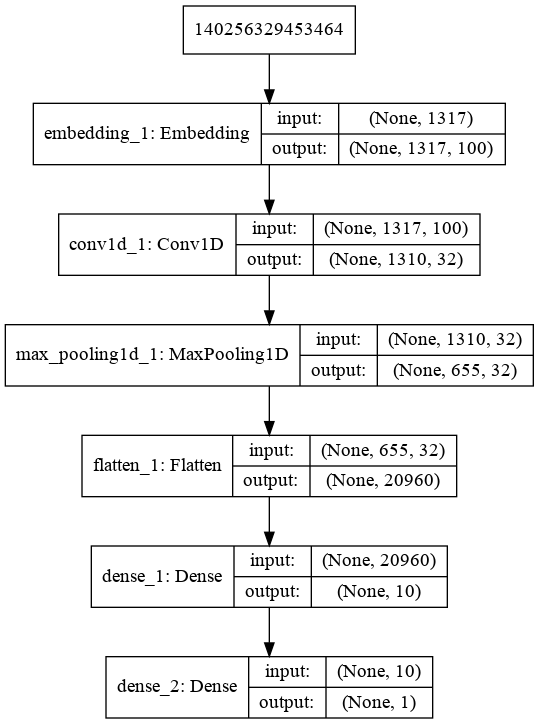
图12.1:定义的CNN分类模型的图。
接下来,我们使网络拟合训练数据。我们使用二元交叉熵损失函数,因为我们正在学习的问题是二元分类问题,随机梯度下降使用Adam算法,除了训练期间的loss之外,我们还跟踪accuracy。该模型训练10个周期,通过一些试验和微调找到合适网络参数配置和训练流程,但目前来说这个模型并不是这个问题的最佳选择。如果您可以使用其他配置获得更好的结果,请告诉我们。
# fit network
model.fit(Xtrain, ytrain, epochs=10, verbose=2)
代码清单12.20:训练定义的分类模型
模型拟合后,将其保存到名为model.h5的文件中以供以后评估
# save the model
model.save('model.h5')
代码清单12.21:将拟合模型保存到文件中
我们可以将所有这些结合在一起。完整的代码清单如下。
import string
import re
from os import listdir
from numpy import array
from keras.preprocessing.text import Tokenizer
from keras.preprocessing.sequence import pad_sequences
from keras.utils.vis_utils import plot_model
from keras.models import Sequential
from keras.layers import Dense
from keras.layers import Flatten
from keras.layers import Embedding
from keras.layers.convolutional import Conv1D
from keras.layers.convolutional import MaxPooling1D
# load doc into memory
def load_doc(filename):
# open the file as read only
file = open(filename, 'r')
# read all text
text = file.read()
# close the file
file.close()
return text
# turn a doc into clean tokens
def clean_doc(doc, vocab):
# split into tokens by white space
tokens = doc.split()
# prepare regex for char filtering
re_punc = re.compile('[%s]' % re.escape(string.punctuation))
# remove punctuation from each word
tokens = [re_punc.sub('', w) for w in tokens]
# filter out tokens not in vocab
tokens = [w for w in tokens if w in vocab]
tokens = ' '.join(tokens)
return tokens
# load all docs in a directory
def process_docs(directory, vocab, is_train):
documents = list()
# walk through all files in the folder
for filename in listdir(directory):
# skip any reviews in the test set
if is_train and filename.startswith('cv9'):
continue
if not is_train and not filename.startswith('cv9'):
continue
# create the full path of the file to open
path = directory + '/' + filename
# load the doc
doc = load_doc(path)
# clean doc
tokens = clean_doc(doc, vocab)
# add to list
documents.append(tokens)
return documents
# load and clean a dataset
def load_clean_dataset(vocab, is_train):
# load documents
neg = process_docs('txt_sentoken/neg', vocab, is_train)
pos = process_docs('txt_sentoken/pos', vocab, is_train)
docs = neg + pos
# prepare labels
labels = array([0 for _ in range(len(neg))] + [1 for _ in range(len(pos))])
return docs, labels
# fit a tokenizer
def create_tokenizer(lines):
tokenizer = Tokenizer()
tokenizer.fit_on_texts(lines)
return tokenizer
# integer encode and pad documents
def encode_docs(tokenizer, max_length, docs):
# integer encode
encoded = tokenizer.texts_to_sequences(docs)
# pad sequences
padded = pad_sequences(encoded, maxlen=max_length, padding='post')
return padded
# define the model
def define_model(vocab_size, max_length):
model = Sequential()
model.add(Embedding(vocab_size, 100, input_length=max_length))
model.add(Conv1D(filters=32, kernel_size=8, activation='relu'))
model.add(MaxPooling1D(pool_size=2))
model.add(Flatten())
model.add(Dense(10, activation='relu'))
model.add(Dense(1, activation='sigmoid'))
# compile network
model.compile(loss='binary_crossentropy', optimizer='adam', metrics=['accuracy'])
# summarize defined model
model.summary()
plot_model(model, to_file='model.png', show_shapes=True)
return model
# load the vocabulary
vocab_filename = 'vocab.txt'
vocab = load_doc(vocab_filename)
vocab = set(vocab.split())
# load training data
train_docs, ytrain = load_clean_dataset(vocab, True)
# create the tokenizer
tokenizer = create_tokenizer(train_docs)
# define vocabulary size
vocab_size = len(tokenizer.word_index) + 1
print(' Vocabulary size: %d ' % vocab_size)
# calculate the maximum sequence length
max_length = max([len(s.split()) for s in train_docs])
print(' Maximum length: %d ' % max_length)
# encode data
Xtrain = encode_docs(tokenizer, max_length, train_docs)
# define model
model = define_model(vocab_size, max_length)
# fit network
model.fit(Xtrain, ytrain, epochs=10, verbose=2)
# save the model
model.save('model.h5')
代码清单12.22:使用嵌入输入层拟合CNN模型的完整示例
运行该示例将首先提供训练数据集词汇表(25,768)的摘要和单词(1,317)中的最大输入序列长度。该示例应该在几分钟内运行,拟合模型将保存到文件中。
Vocabulary size: 25768
Maximum length: 1317
......
Epoch 1/10
- 3s - loss: 0.6897 - acc: 0.5472
Epoch 2/10
- 0s - loss: 0.5031 - acc: 0.7983
Epoch 3/10
- 0s - loss: 0.0575 - acc: 0.9944
Epoch 4/10
- 1s - loss: 0.0050 - acc: 0.9994
Epoch 5/10
- 1s - loss: 0.0020 - acc: 0.9994
Epoch 6/10
- 1s - loss: 0.0012 - acc: 1.0000
Epoch 7/10
- 1s - loss: 7.7507e-04 - acc: 1.0000
Epoch 8/10
- 1s - loss: 5.6739e-04 - acc: 1.0000
Epoch 9/10
- 1s - loss: 4.1537e-04 - acc: 1.0000
Epoch 10/10
- 1s - loss: 3.1658e-04 - acc: 1.0000
代码清单12.23:拟合模型的示例输出
12.5 评估模型
在本节中,我们将评估训练模型并使用它来预测新数据。首先,我们可以使用内置的evaluate()函数来估计模型在训练和测试数据集上的表现。这要求我们加载和编码训练和测试数据集。
# load all reviews
train_docs, ytrain = load_clean_dataset(vocab, True)
test_docs, ytest = load_clean_dataset(vocab, False)
# create the tokenizer
tokenizer = create_tokenizer(train_docs)
# define vocabulary size
vocab_size = len(tokenizer.word_index) + 1
print( ' Vocabulary size: %d ' % vocab_size)
# calculate the maximum sequence length
max_length = max([len(s.split()) for s in train_docs])
print( ' Maximum length: %d ' % max_length)
# encode data
Xtrain = encode_docs(tokenizer, max_length, train_docs)
Xtest = encode_docs(tokenizer, max_length, test_docs)
代码清单12.24:加载和编码训练和测试数据集。
然后我们可以加载模型并在两个数据集上对其进行评估并打印精度。
# load the model
model = load_model('model.h5')
# evaluate model on training dataset
_, acc = model.evaluate(Xtrain, ytrain, verbose=0)
print(' Train Accuracy: %f ' % (acc * 100))
# evaluate model on test dataset
_, acc = model.evaluate(Xtest, ytest, verbose=0)
print(' Test Accuracy: %f ' % (acc * 100))
代码清单12.25:在train和test数据集上加载和评估模型。
然后必须使用与训练数据集上相同的文本编码方案来准备新数据。准备好后,可以通过调用模型上的predict()函数来进行预测。以下名为predict_sentiment()的函数将对给定的电影评论文本进行编码和填充,并根据百分比和标签返回预测。
# classify a review as negative or positive
def predict_sentiment(review, vocab, tokenizer, max_length, model):
# clean review
line = clean_doc(review, vocab)
# encode and pad review
padded = encode_docs(tokenizer, max_length, [line])
# predict sentiment
yhat = model.predict(padded, verbose=0)
# retrieve predicted percentage and label
percent_pos = yhat[0, 0]
if round(percent_pos) == 0:
return (1 - percent_pos), 'NEGATIVE'
return percent_pos, 'POSITIVE'
代码清单12.26:用于预测临时电影评论的情绪的函数
我们可以通过两个特别的电影评论来测试这个模型。下面列出了完整的示例。
import string
import re
from os import listdir
from numpy import array
from keras.preprocessing.text import Tokenizer
from keras.preprocessing.sequence import pad_sequences
from keras.models import load_model
# load doc into memory
def load_doc(filename):
# open the file as read only
file = open(filename, 'r')
# read all text
text = file.read()
# close the file
file.close()
return text
# turn a doc into clean tokens
def clean_doc(doc, vocab):
# split into tokens by white space
tokens = doc.split()
# prepare regex for char filtering
re_punc = re.compile('[%s]' % re.escape(string.punctuation))
# remove punctuation from each word
tokens = [re_punc.sub('', w) for w in tokens]
# filter out tokens not in vocab
tokens = [w for w in tokens if w in vocab]
tokens = ' '.join(tokens)
return tokens
# load all docs in a directory
def process_docs(directory, vocab, is_train):
documents = list()
# walk through all files in the folder
for filename in listdir(directory):
# skip any reviews in the test set
if is_train and filename.startswith('cv9'):
continue
if not is_train and not filename.startswith('cv9'):
continue
# create the full path of the file to open
path = directory + '/' + filename
# load the doc
doc = load_doc(path)
# clean doc
tokens = clean_doc(doc, vocab)
# add to list
documents.append(tokens)
return documents
# load and clean a dataset
def load_clean_dataset(vocab, is_train):
# load documents
neg = process_docs('txt_sentoken/neg', vocab, is_train)
pos = process_docs('txt_sentoken/pos', vocab, is_train)
docs = neg + pos
# prepare labels
labels = array([0 for _ in range(len(neg))] + [1 for _ in range(len(pos))])
return docs, labels
# fit a tokenizer
def create_tokenizer(lines):
tokenizer = Tokenizer()
tokenizer.fit_on_texts(lines)
return tokenizer
# integer encode and pad documents
def encode_docs(tokenizer, max_length, docs):
# integer encode
encoded = tokenizer.texts_to_sequences(docs)
# pad sequences
padded = pad_sequences(encoded, maxlen=max_length, padding='post')
return padded
# classify a review as negative or positive
def predict_sentiment(review, vocab, tokenizer, max_length, model):
# clean review
line = clean_doc(review, vocab)
# encode and pad review
padded = encode_docs(tokenizer, max_length, [line])
# predict sentiment
yhat = model.predict(padded, verbose=0)
# retrieve predicted percentage and label
percent_pos = yhat[0, 0]
if round(percent_pos) == 0:
return (1 - percent_pos), 'NEGATIVE'
return percent_pos, 'POSITIVE'
# load the vocabulary
vocab_filename = 'vocab.txt'
vocab = load_doc(vocab_filename)
vocab = set(vocab.split())
# load all reviews
train_docs, ytrain = load_clean_dataset(vocab, True)
test_docs, ytest = load_clean_dataset(vocab, False)
# create the tokenizer
tokenizer = create_tokenizer(train_docs)
# define vocabulary size
vocab_size = len(tokenizer.word_index) + 1
print('Vocabulary size: %d' % vocab_size)
# calculate the maximum sequence length
max_length = max([len(s.split()) for s in train_docs])
print('Maximum length: %d' % max_length)
# encode data
Xtrain = encode_docs(tokenizer, max_length, train_docs)
Xtest = encode_docs(tokenizer, max_length, test_docs)
# load the model
model = load_model('model.h5')
# evaluate model on training dataset
_, acc = model.evaluate(Xtrain, ytrain, verbose=0)
print(' Train Accuracy: %.2f ' % (acc * 100))
# evaluate model on test dataset
_, acc = model.evaluate(Xtest, ytest, verbose=0)
print(' Test Accuracy: %.2f ' % (acc * 100))
# test positive text
text = 'Everyone will enjoy this film. I love it, recommended!'
percent, sentiment = predict_sentiment(text, vocab, tokenizer, max_length, model)
print(' Review: [%s]\nSentiment: %s (%.3f%%) ' % (text, sentiment, percent * 100))
# test negative text
text = 'This is a bad movie. Do not watch it. It sucks.'
percent, sentiment = predict_sentiment(text, vocab, tokenizer, max_length, model)
print(' Review: [%s]\nSentiment: %s (%.3f%%) ' % (text, sentiment, percent * 100))
代码清单12.27:对新文本数据进行预测的完整示例
首先运行示例在训练和测试数据集上打印模型的性能。我们可以看到,该模型在训练数据集上达到了100%的准确率,在测试数据集上达到了88%,这是一个令人印象深刻的分数。
接下来,我们可以看到该模型对两个人为的电影评论进行了正确的预测。我们可以看到两者的预测百分比或置信度接近50%,这可能是因为两个人为的评论很短,模型预计会有1000个或更多单词的序列。
注意:鉴于神经网络的随机性,您的具体结果可能会有所不同。考虑运行几次示例。
Vocabulary size: 25768
Maximum length: 1317
Train Accuracy: 100.00
Test Accuracy: 88.00
Review: [Everyone will enjoy this film. I love it, recommended!]
Sentiment: POSITIVE (72.904%)
Review: [This is a bad movie. Do not watch it. It sucks.]
Sentiment: POSITIVE (67.393%)
代码清单12.28:对新评论进行预测的示例输出
12.6 扩展
本节列出了一些扩展,可能是您希望尝试的想法。
- 数据清理。尝试更好的数据清理,保留一些标点符号或正常连词。
- 截断序列。如果最长序列与所有其他评论非常不同,则将所有序列填充到最长序列的长度可能是极端的,考虑评论长度的分布并将评论截断为平均长度。
- 截断词汇。我们删除了不常出现的单词,但仍然有超过25,000个单词的大词汇量。进一步尝试减少词汇量的大小和对模型性能的影响。
- 过滤器和内核大小。过滤器的数量和内核大小对于模型性能很重要,但是本例没有调整,可以试着调整这两个CNN参数。
- epoch和批量大小。该模型似乎很快拟合了训练数据集。尝试训练epoch和批量大小的等同配置,并使用测试数据集作为验证集,为训练模型选择更好的停止点。
- 更深的网络。尝试更深层次的网络是否会带来更好的技能,无论是CNN层,MLP层还是两者。
- 使用预训练嵌入模型。尝试在模型中预先训练Word2Vec单词嵌入以及在训练期间进行进一步微调的对模型性能的影响。
- 使用GloVe嵌入。尝试加载预训练的GloVe嵌入和对模型技能的影响,尝试在训练期间进一步微调或者不动。
- 更长的测试评论。探讨模型预测的技巧是否依赖于评估模型的最后部分中所怀疑的电影评论的长度。
- 训练最终模型。训练所有可用数据的最终模型,并使用它来预测来自互联网的真实临时电影评论。
如果你尝试任何这些扩展,我很想知道。
0 条 查看最新 评论
没有评论